How to prepare content for an event LED wall
LED walls rarely use a standard 16:9 format. Learn how to prepare presentations, video and graphics to fit any LED screen in any venue.

An LED wall can completely change the look of an event, but for it to have maximum impact content needs to been designed for the screen.
A standard PowerPoint deck is a 16:9 ratio, the same shape as a television for example. Event LED walls can be almost any size or shape. They may be extremely wide, made from several separate surfaces, or partially covered by scenic elements.
If standard slides are sent to a wide LED wall without a content plan, they normally appear as a rectangle in the middle with unused space on either side. The screen is large, but the presentation still feels small.
The fix is not always to rebuild every slide. It starts with getting the right information and deciding which parts of the event need custom content.
Ask for the pixel map before designing anything
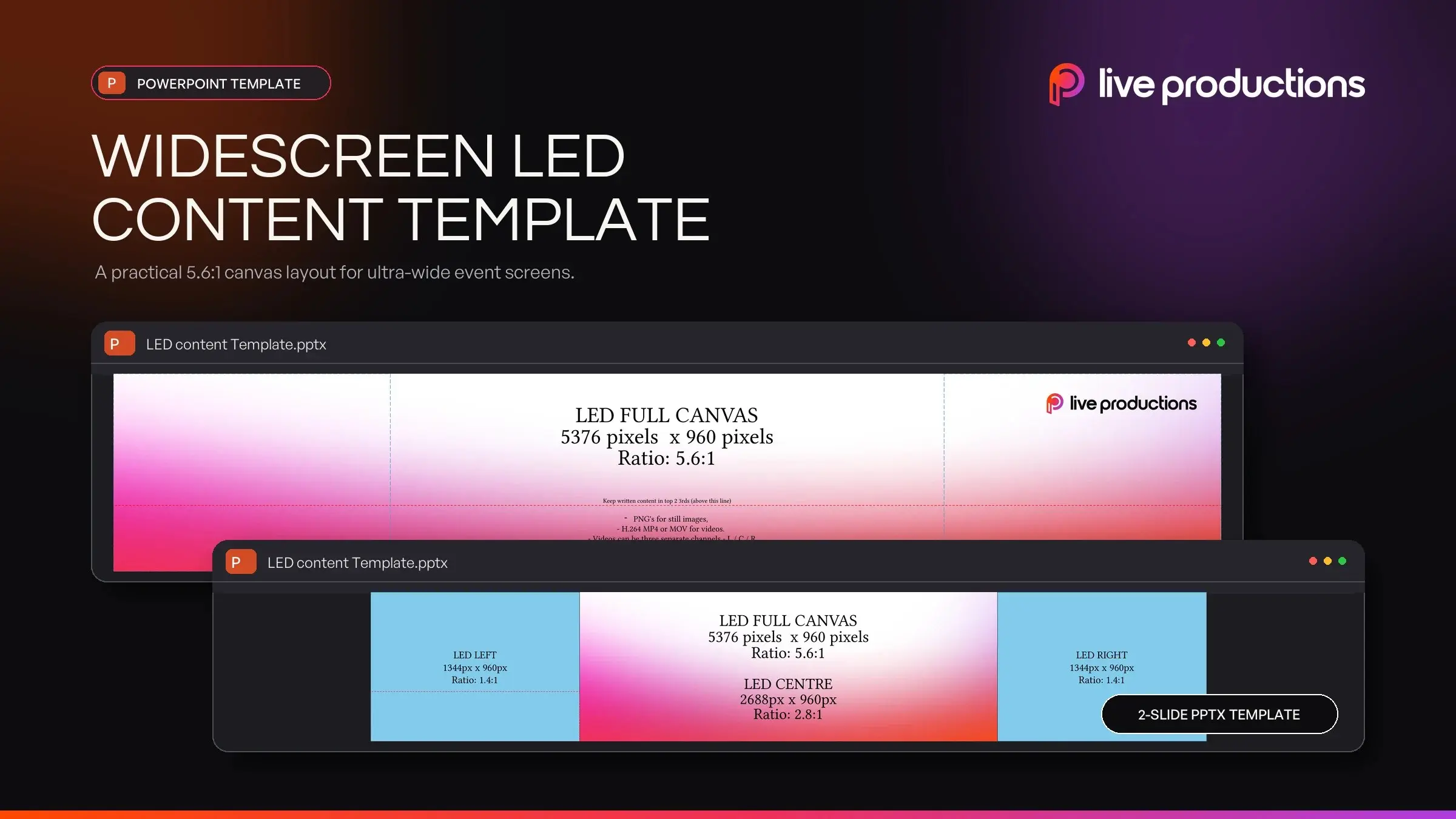
The physical size of the LED wall is useful, but the content designer needs its exact pixel dimensions.
Ask your AV or production company for a pixel map or a full screen slide template. This should show:
- the width and height of each LED surface in pixels
- how separate screens or sections relate to one another
- any gaps, masking or scenic elements that interrupt the image
- the safe areas for important text, logos and presenter information
Do not assume the wall is 1920 x 1080 just because that is the usual PowerPoint size. The playback system can scale content, but it cannot make the wrong shape look intentionally designed.
Plan the screen in zones
A wide LED wall does not need to display one enormous slide at all times. It is often more useful to divide the canvas into clear zones.
For example, the centre might contain a speaker's standard PowerPoint slides while the surrounding space carries event branding, the session title or a subtle animated background. During a panel, part of the screen might be used for camera feeds and another part for speaker names.
This approach is often called picture-in-picture, or PIP. It lets presenters continue using a familiar 16:9 deck while the audience sees a screen layout designed for the full LED wall.
The layout should be agreed before content production starts. Otherwise, designers may place important information where it will later be covered by a presenter, lectern, loudspeaker, lighting fixture or scenic element.
Decide what needs to be readable
Some screen content carries information. Other content creates atmosphere.
Presentation slides, speaker names, award categories and data need to be readable from the back of the room. Background animation, patterns and decorative graphics can be less detailed.
Make that distinction early. It helps the designer decide which screen areas should carry essential content and which can support the visual design.
There is no single font size that works for every event. A font that looks enormous on a laptop may still be difficult to read from the back row of a ballroom. Use fewer words, strong contrast and simple layouts, then test the content at the expected viewing distance.
Fine lines, small charts and dense tables are common problems. They may look sharp on a designer's monitor but disappear once viewed across a large room.
Choose the right level of content production
There are three practical ways to handle content for an LED wall.
1. Use standard presentation decks
This is the simplest option and works well when there are many presenters, frequent edits or a content-heavy conference program.
The deck can run in its normal 16:9 format, but it will not fill an unusually wide screen by itself. A full screen background graphic can fill in the spaces around the presentation and make it look intentional. These are easy enough to make ahead of time.
2. Put standard slides inside a designed frame
For most conferences, this is the best balance between appearance and flexibility.
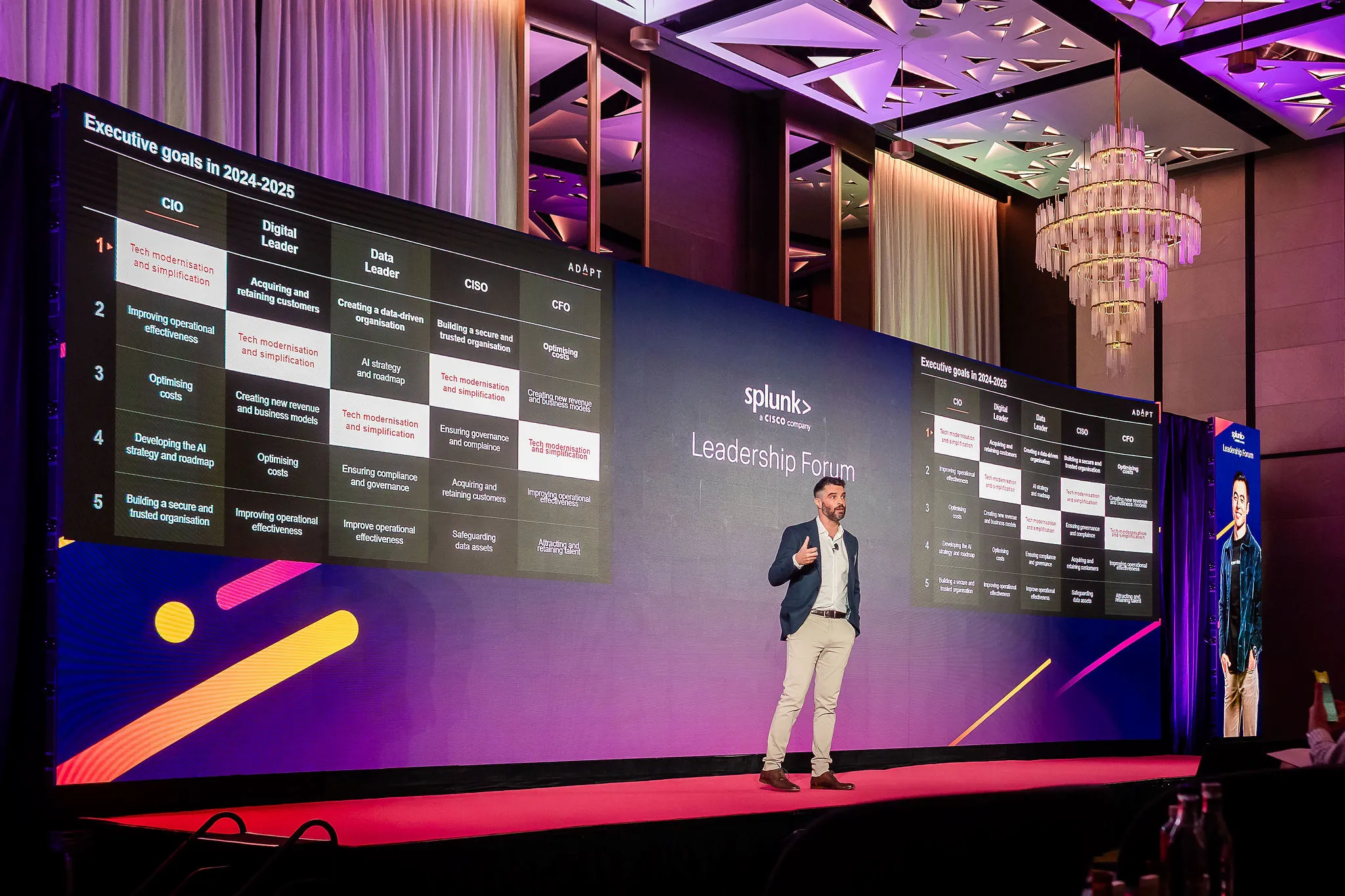
The production team creates a full-width branded layout, with a dedicated 16:9 area for PowerPoint. Custom holding screens, speaker titles, session openers and break graphics can use the entire LED canvas.
Presenters can keep updating their normal decks, while the wider screen still feels considered and connected to the event brand.
3. Create everything for the full LED canvas
Fully custom content works well for product launches, awards nights, entertainment segments and major opening moments.
Every graphic and animation is built for the exact screen layout, often with playback from a media server. The result gives the creative team much more control, but it also requires more production time and earlier approval. Large animated files are harder to revise at the last minute than a PowerPoint slide.
Many events use a combination of all three approaches. Standard decks handle detailed speaker content, while full-canvas graphics are reserved for the moments where visual impact matters most.
Design for the room, not the laptop
Content should be reviewed in the context of the event space.
Leave breathing room around important information. A logo positioned against the edge of the canvas may be technically visible but still feel cramped or disappear from some seats.
It is also worth checking colour and brightness during setup. Very bright white backgrounds can overpower a room, affect cameras and make presenters uncomfortable. Darker backgrounds with strong contrast often sit better in a live environment, although the right choice depends on the event and brand.
Confirm the playback specifications
Ask the production team how each type of content will be played before exporting final files.
PowerPoint, keynote slides, video, still graphics and media-server content may all have different requirements. Confirm:
- the required pixel dimensions
- preferred file formats and video codecs
- frame rate for animation and video
- whether audio is embedded or supplied separately
- how transparency should be handled
- who will load, test and approve the final files
Avoid sending only cloud links on show day. Provide downloadable files with clear names and version numbers, then keep all final content in one agreed folder.
Set a realistic content deadline
Late changes are normal at corporate events, especially for speaker decks. The process should allow for them without putting every piece of content at risk.
Separate flexible content from locked content. Speaker PowerPoints may remain editable closer to the event, while full-screen animation, show openers and award sequences should be approved earlier so they can be rendered, loaded and tested.
Agree on:
- when the first content is due for testing
- the final deadline for custom graphics and video
- the cut-off for presenter deck changes
- who combines presentations onto the show computers
- who has authority to approve last-minute changes
Clear ownership matters as much as the deadline. It prevents several people from sending different versions of the same file to the operator.
LED wall content checklist
Before your designer starts, confirm:
- the exact pixel dimensions of every screen surface
- the physical screen layout and any gaps or masking
- safe areas for text and logos
- audience sightlines and the distance to the back row
- which content must be readable and which is decorative
- whether standard slides will sit inside a designed frame
- the playback method for presentations, video and animation
- file formats, frame rates and naming conventions
- content deadlines, approval responsibilities and version control
A large LED wall gives you more creative space, but it also needs more planning than a standard presentation screen. Get the pixel map early, design around the room and save full-canvas content for the moments that deserve it. That will make the screen feel like part of the event rather than a large surface displaying a small slide.
Frequently asked questions
What resolution should content for an LED wall be?
Use the native pixel dimensions supplied by the event's AV or production team. LED walls are modular, so their resolution depends on the wall's size, shape and panel configuration. It is often different from standard 1920 x 1080 content.
Can we use a normal PowerPoint deck on an LED wall?
Yes. A standard 16:9 deck can be displayed on an LED wall, but it may not fill a wide canvas. Placing the deck inside a custom branded frame usually gives a better result without forcing presenters to rebuild their slides.
What is PIP on an event screen?
PIP means picture-in-picture. In event production, it usually describes a screen layout where presentation slides, cameras or other sources sit inside a larger designed canvas.
How large should text be on an LED wall?
There is no universal font size because the answer depends on the wall, room and viewing distance. Use less text, strong contrast and a test from the back of the room rather than judging it only on a laptop.
How early should LED wall content be finished?
Simple presentation decks can remain flexible closer to the event. Custom animation and full-canvas video need more time for design, rendering and testing. Agree on separate deadlines with the production team at the start of the project.

Discover more resources

Giving the world a better AV experience.
Based in Sydney. Delivering events across Australia and internationally since 2005.
Member of the AV Alliance